To use the White-label Form links, you need to have an adequate subscription and to have configured your forms and branding in Settings. For details on how to set up your branding, please refer to the Configure Your Branding article.
White-label Form links allow you to send your customers a link to a verification form with your own branding, where they can submit their identity data themselves. The process for generating a link is exactly the same as submitting a KYC or KYB verification:
- Log into your bronID Portal account.
- In the left-hand menu, under ID Verification, go to Verify IDs (KYC & KYB).
- (Optional) Fill out the Metadata section (Submit on behalf of, Tags, and User ID). On-behalf submission is available only for Distributor accounts. Depending on your selection in the Metadata section, the applicable parameters, such as Tags or User IDs, will be attached to the submission when it is submitted and processed. If you have a Distributor subscription, you can route different submissions and generate different links for different on-behalf accounts.
- Select the entity type. In the Select entity type section, choose the Country, the Entity Type, and, where applicable, the Sub Type.
- Fill out the fields within the form, as you would for a KYC or KYB verification. This step is optional. You can also generate an empty form. If you fill out some of the information, the customer will receive a form with that data already pre-filled.
- Instead of clicking Submit, click the down arrow on the button and select Generate Form Link. A unique White-label Form link will be created.
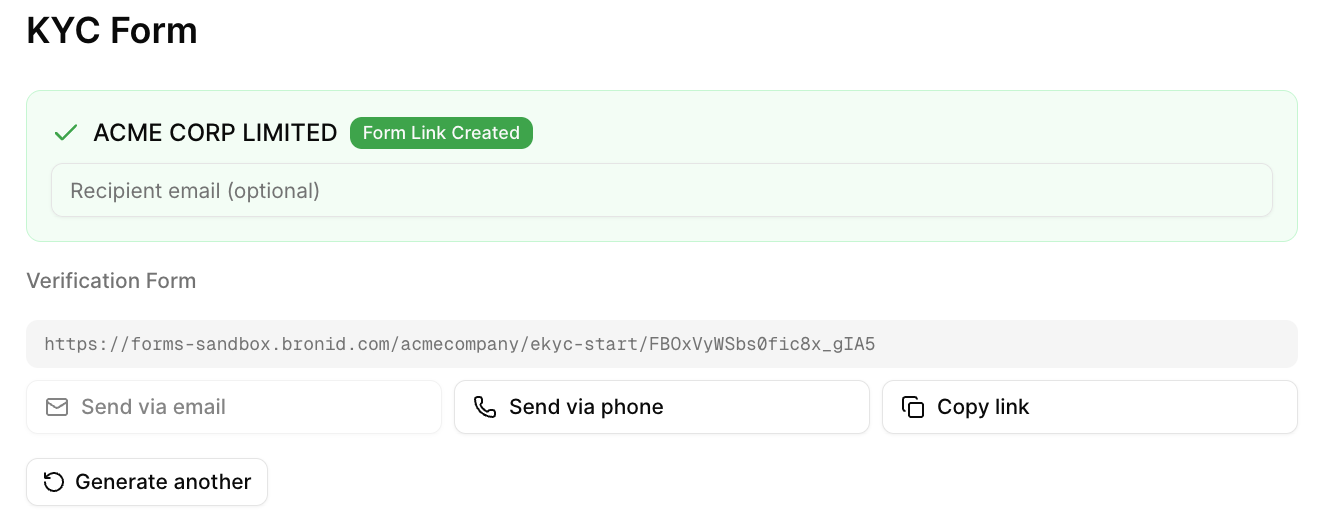
- Once the link is generated, a confirmation will appear showing the entity name and a Form Link Created badge, along with the unique Verification Form URL (e.g. https://forms.bronid.com.bronid.com/acmecompany/ekyc-start/...). From here you can share the link with your customer using the available options: Send via email, Send via phone, or Copy link and send it via other means.
- Send the link to your customer and instruct them on how to complete the verification. Beyond delivering the link via the options above, bronID does not follow up with the customer, so it is your responsibility to guide them through completing the form.