

You can screen an individual or organisation that you have verified via bronID against a list of curated reputable media sources to check for any negative and damaging information. These media sources include regulators' press releases, court filings, transcripts of court proceedings, news articles, and other similar reputable media outlets.
To run a negative media screening on an already existing verification, follow the steps below:
- Log into your bronID Portal account.
- In the left-hand menu, under ID Verification, go to Results.
- Click on the individual or organisation you want to screen.
- In the right-hand slider, click Show details.
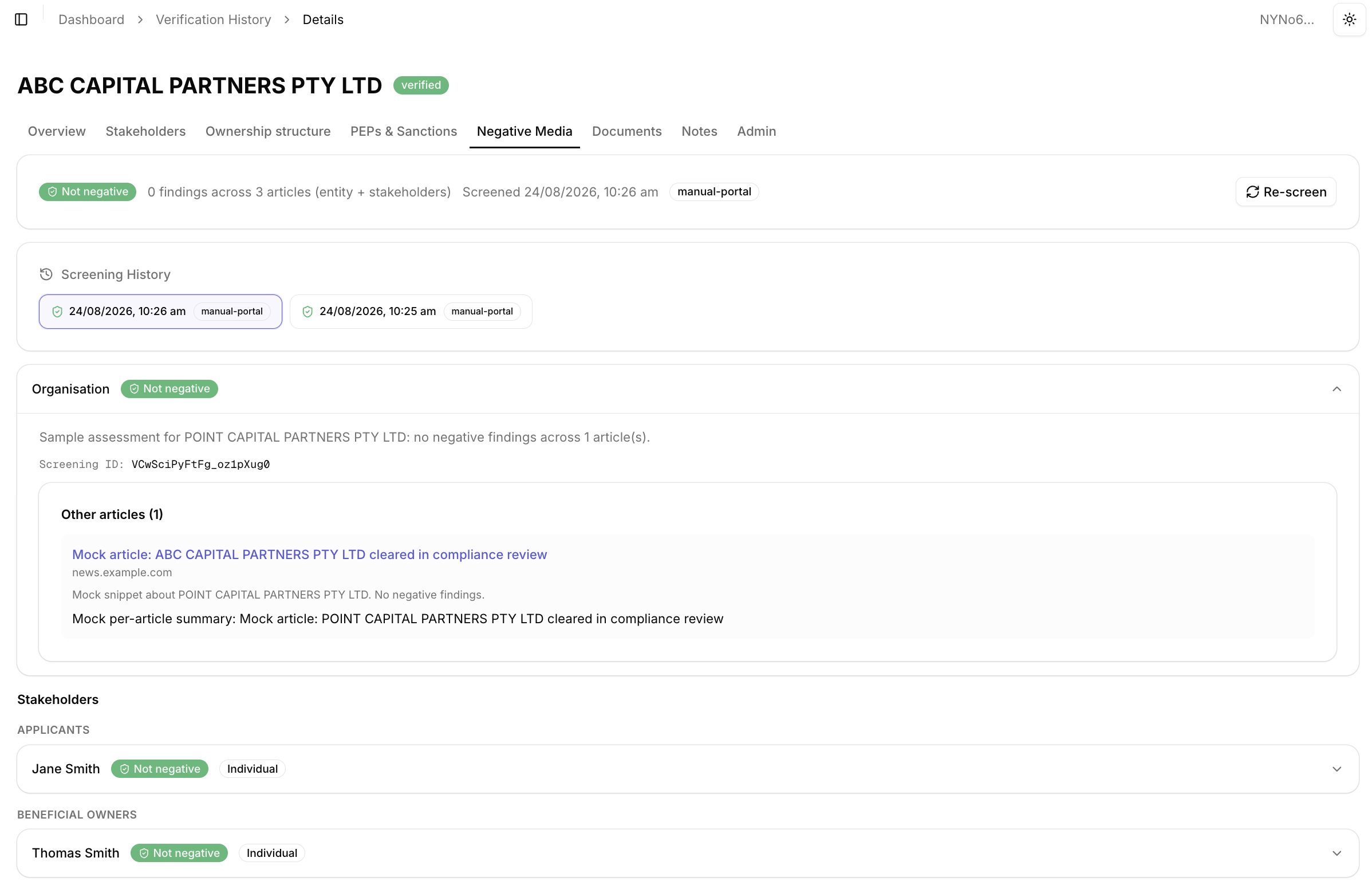
- Select the Negative Media tab. At the top of the tab, you will see the latest screening result, including the overall status the number of findings across the articles analysed (e.g. 0 findings across 3 articles (entity + stakeholders)), the date and time of the screening, and the screening trigger.
- Click Re-screen to run a new screening. Within seconds, the system will pull data from all available media sources and screen the text for any negative connotations related to the screened subject. The results will be displayed on the page.
For KYB verifications, the screening is performed for the organisation and the relevant stakeholders (e.g. applicants and beneficial owners) that were processed via bronID. Each entry displays its own status badge and can be expanded to view the details.
View Detailed Results
To view the details of the screening results, expand the relevant entry by clicking on the down arrow. You will see the assessment summary, the Screening ID, and the list of analysed articles, with each article's title, source, snippet, and a per-article summary. The article titles link to the original sources so you can investigate further.
If bronID finds any potential negative media, the entry will be flagged, and bronID will provide a summary of the negative connotations found, along with the top data sources where the negative media was detected and links to them so you can investigate further and check for false positives.
If no negative media is detected, the entry will show the Not negative status, and if applicable, a summary of the analysed articles will be provided. If there are no relevant reports on the screened subject, it can be concluded that there are no negative media reports.
View Previous Screening Results
To check the results from previous negative media screenings, open the Screening History section and select the screening you want to review. Each entry shows the date and time of the screening and the screening trigger (e.g. manual-portal for screenings run manually from the Portal).
Negative Media and False Positives
Note that negative media screening is susceptible to false positives, much more so than false negatives. Although bronID reads and understands the context of the text and analyses whether the screened subject is the one actually committing the negative act, rather than being adjacent to it in a different way, depending on the content of the negative media, screening may return a summarised result that the subject is involved in a negative connotation. For instance, a witness in a case involving money laundering or fraud might be flagged for negative media coverage, despite not being the subject of the allegations themselves but merely associated with the case.
In such cases, bronID will provide a detailed list of articles where you can check for more information and perform a more detailed analysis to investigate further.


