

To view your verifications, log into your bronID Portal account and, in the left-hand menu under ID Verification, go to Results.
Viewing the Details of an Organisation Verification
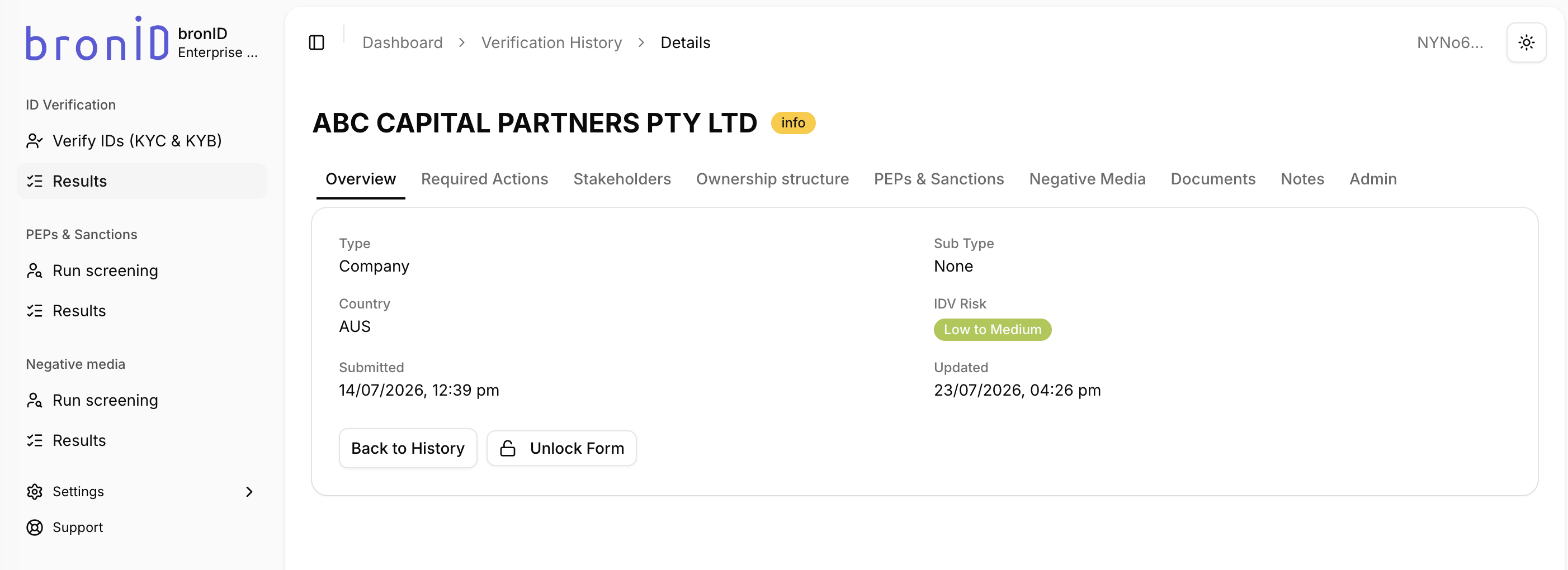
To review the details of a KYB verification, click on the submission in the results table and then click Show details. The details page shows the organisation's name and status at the top, along with the following tabs:
- Overview: The key details of the verification at a glance, including the Type (e.g. Company), Sub Type, Country, IDV Risk, and the Submitted and Updated dates. From here you can click Back to History to return to the Verification History page, or Unlock Form to reopen the verification form.
- Required Actions: Shown when the verification is in the info status, this tab outlines the outstanding actions needed to complete the verification, such as verifying the identified stakeholders or uploading requested documents.
- Stakeholders: The individuals and entities identified as stakeholders of the organisation, and their verification status.
- Ownership structure: The ownership structure of the organisation, showing how the entity is owned and controlled.
- PEPs & Sanctions: The results of the PEP, Sanctions, and Criminal Watchlist screening.
- Negative Media: The results of the negative media screening.
- Documents: The documents submitted or generated as part of the verification.
- Notes: Any notes appended to the verification, including bronID's guidance comments (e.g. the reason why a specific document or UBO was requested).
- Admin: Administrative and technical details about the submission, including identifiers that can be copied and are useful when contacting bronID support or matching the verification against API results and webhooks.
Interpreting the Verification Status
Once you submit a KYB check, it can go to two interim statuses, pending and info, or two end statuses, verified and rejected.

Pending
When the verification status is pending, it means that the KYB submission has been received and is waiting on bronID to perform the verification process. You will receive an email, a notification in the Portal, and a webhook when the status of this verification is updated and goes to the next state.
In some cases, the verification status will be pending for an extended period. This can happen if the processing time of the data source which needs to be accessed is long (24+ hours), the data source was not available at the time of submission and bronID has to retry the verification, the data source experienced an error processing the request, or another type of error occurred.
Info
The info status means that bronID requires you to provide additional information, such as the personal details of the listed UBOs, or to upload a document (e.g. Deed of Variation for the Change of Trust Name, Unit Register, etc.). To resolve the info request and see what you need to provide, click on the organisation in the results table, and the requested information will be outlined in the Required Actions tab of the right-hand slider.
Commonly required actions:
- Verify stakeholders: A likely scenario is for bronID to request that the identified UBOs of the organisation be verified. For each stakeholder, you will see the Reason (e.g. Ultimately owns or controls the entity) and a Description (e.g. Person who owns or controls 25% or more of the entity). You can click Verify to verify the stakeholder directly, click Remove stakeholder if the stakeholder is not applicable, or use the Form link to have the stakeholder complete the verification themselves.
- Provide documents: bronID may also request that you upload more information to facilitate the verification process. To upload a requested document, click on the link with the name of that document in the Required Actions tab.
bronID may include guidance comments in the Notes tab to make the interpretation of the info request easier, such as the reason why a specific document or UBO was requested.
Once the required actions are completed, the verification status will go to either pending or verified. You will receive an email, a notification in the Portal, and a webhook when the status of this verification is updated and goes to the next state.
Verified
The bronID verification process is complete once the verification status is verified. This means that all the requirements in accordance with bronID's ID Verification Procedural Manual have been satisfied. You can see the IDV Certificate in the right-hand slider, or by clicking Show details and opening the Documents tab. You will receive an email, a notification in the Portal, and a webhook when the status of this verification is updated and the verification is completed.
Rejected
If the verification status is rejected, bronID was unable to verify the submitted organisation using the information provided. You will receive an email, a notification in the Portal, and a webhook when the status of this verification is updated to rejected. Review the organisation information and re-attempt a new verification.
Often the reason for a rejected verification is that the submitted data is incorrect or the organisation with the submitted name and number is not formally incorporated or established. The reason(s) for the rejection is always included in the Notes tab, where bronID provides guidance comments explaining why the entity was rejected.
Possible reasons for a rejected verification status are:
- the Organisation Type is incorrect;
- the Organisation Name is incorrect;
- the organisation cannot be found in any independent and reliable databases;
- the organisation does not exist in the selected country;
- the organisation is not currently registered in the relevant jurisdiction.
Uploading documents in the Documents tab of a rejected entity does not re-attempt or update the verification in the same way it does with an info request. However, you can still add supplementary documentation for the purposes of record-keeping in the bronID Portal.


